To
Camel supports the Message Endpoint from the EIP patterns using the Endpoint interface.
How does an application connect to a messaging channel to send and receive messages?
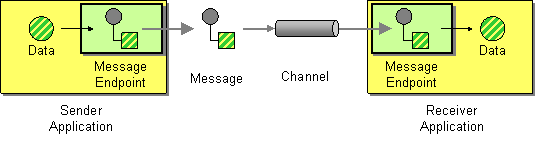
Connect an application to a messaging channel using a Message Endpoint, a client of the messaging system that the application can then use to send or receive messages.
Options
The To eip supports 1 options, which are listed below.
| Name | Description | Default | Type |
|---|---|---|---|
note | Sets the note of this node. | String | |
description | Sets the description of this node. | String | |
disabled | Disables this EIP from the route. | false | Boolean |
variableSend | To use a variable as the source for the message body to send. This makes it handy to use variables for user data and to easily control what data to use for sending and receiving. Important: When using send variable then the message body is taken from this variable instead of the current message, however the headers from the message will still be used as well. In other words, the variable is used instead of the message body, but everything else is as usual. | String | |
variableReceive | To use a variable to store the received message body (only body, not headers). This makes it handy to use variables for user data and to easily control what data to use for sending and receiving. Important: When using receive variable then the received body is stored only in this variable and not on the current message. | String | |
uri | Required Sets the uri of the endpoint to send to. | String | |
pattern | Sets the optional ExchangePattern used to invoke this endpoint. Enum values:
| ExchangePattern |
Exchange properties
The To eip supports 1 exchange properties, which are listed below.
The exchange properties are set on the Exchange by the EIP, unless otherwise specified in the description. This means those properties are available after this EIP has completed processing the Exchange.
| Name | Description | Default | Type |
|---|---|---|---|
CamelToEndpoint | Endpoint URI where this Exchange is being sent to. | String |
Different between To and ToD
The to is used for sending messages to a static endpoint. In other words to sends messages only to the same endpoint.
The toD is used for sending messages to a dynamic endpoint. The dynamic endpoint is evaluated on-demand by an Expression. By default, the Simple expression is used to compute the dynamic endpoint URI.
the Java DSL also provides a toF EIP, which can be used to avoid concatenating route parameters and making the code harder to read. |
Using To
The following example route demonstrates the use of a File consumer endpoint and a JMS producer endpoint, by their URIs:
-
Java
-
XML
-
YAML
from("file:messages/foo")
    .to("jms:queue:foo");
<route>
<from uri="file:messages/foo"/>
<to uri="jms:queue:foo"/>
</route>- route:
from:
uri: file:messages/foo
steps:
- to:
uri: jms:queue:fooHow to use a dynamic URI in to
A dynamic URI is an endpoint URI that varies depending on inflight routing information, such as Exchange properties, message headers, the body, the Camel Context, etc.
For example, if you’re using a Freemarker producer and the template location is provided inside the current message, you might expect the following code to work, but it will not.
| This is not valid code This snippet is not valid code. Read on. |
-
Java
-
XML
-
YAML
from("file:messages/foo")
    .to("freemarker://templateHome/${body.templateName}.ftl")
    .to("jms:queue:foo");
<route>
<from uri="file:messages/foo"/>
<to uri="freemarker://templateHome/${body.templateName}.ftl"/>
<to uri="jms:queue:foo"/>
</route>- route:
from:
uri: file:messages/foo
steps:
- to:
uri: "freemarker://templateHome/${body.templateName}.ftl"
- to:
uri: jms:queue:fooIn this case, you must use an EIP (Enterprise Integration Pattern) that is capable of computing a dynamic URI using an Expression, such as the toD or Recipient List EIP pattern.
| This is valid code This snippet is valid code. |
To fix the above problem we can use either toD or recipientList. Using toD is easier as shown below:
-
Java
-
XML
-
YAML
Use toD for dynamic URIs
from("file:messages/foo")
    .toD("freemarker://templateHome/${body.templateName}.ftl")
    .to("jms:queue:foo");
Use <toD> for dynamic URIs
<route>
    <from uri="file:messages/foo"/>
    <toD uri="freemarker://templateHome/${body.templateName}.ftl"/>
    <to uri="jms:queue:foo"/>
</route>
Use - toD: for dynamic URIs
- route:
    from:
      uri: file:messages/foo
      steps:
        - toD:
            uri: "freemarker://templateHome/${body.templateName}.ftl"
        - to:
            uri: jms:queue:foo
When using recipient list:
.recipientList(simple("freemarker://templateHome/${body.templateName}.ftl"))-
Java
-
XML
-
YAML
Use recipientList for more flexible and dynamic URIs
from("file:messages/foo")
    .recipientList(simple("freemarker://templateHome/${body.templateName}.ftl"))
    .to("jms:queue:foo");
Use <recipientList> for more flexible and dynamic URIs
<route>
    <from uri="file:messages/foo"/>
    <recipientList>
        <simple>freemarker://templateHome/${body.templateName}.ftl</simple>
    </recipientList>
    <to uri="jms:queue:foo"/>
</route>
Use - recipientList: for more flexible and dynamic URIs
- route:
    from:
      uri: file:messages/foo
      steps:
        - recipientList:
            expression:
              simple:
                expression: "freemarker://templateHome/${body.templateName}.ftl"
        - to:
            uri: jms:queue:foo